
Command
Description
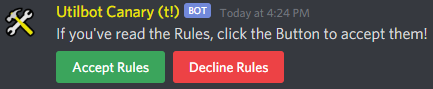
Posts the rules message with its Accept / Decline buttons in the given channel and sets the role that Members get when they accept the rules.disable deletes the rules message and switches the feature off.
The text of the rules is written on the Rules page of the dashboard. Without any text, the message only contains the prompt and the buttons. The channel and the role can also be picked on that page, where saving posts or updates the rules message, so this command is not needed for the setup.
The role has to be below your own highest role. Only the server owner is exempt from this.
Permission
ADMINISTRATOR
Arguments
*: This is required on the 'enable' subcommand and not available on 'disable'.
Sample Response
Enable

Disable